AI Lead Machine Agent
AI Lead Machine Agent
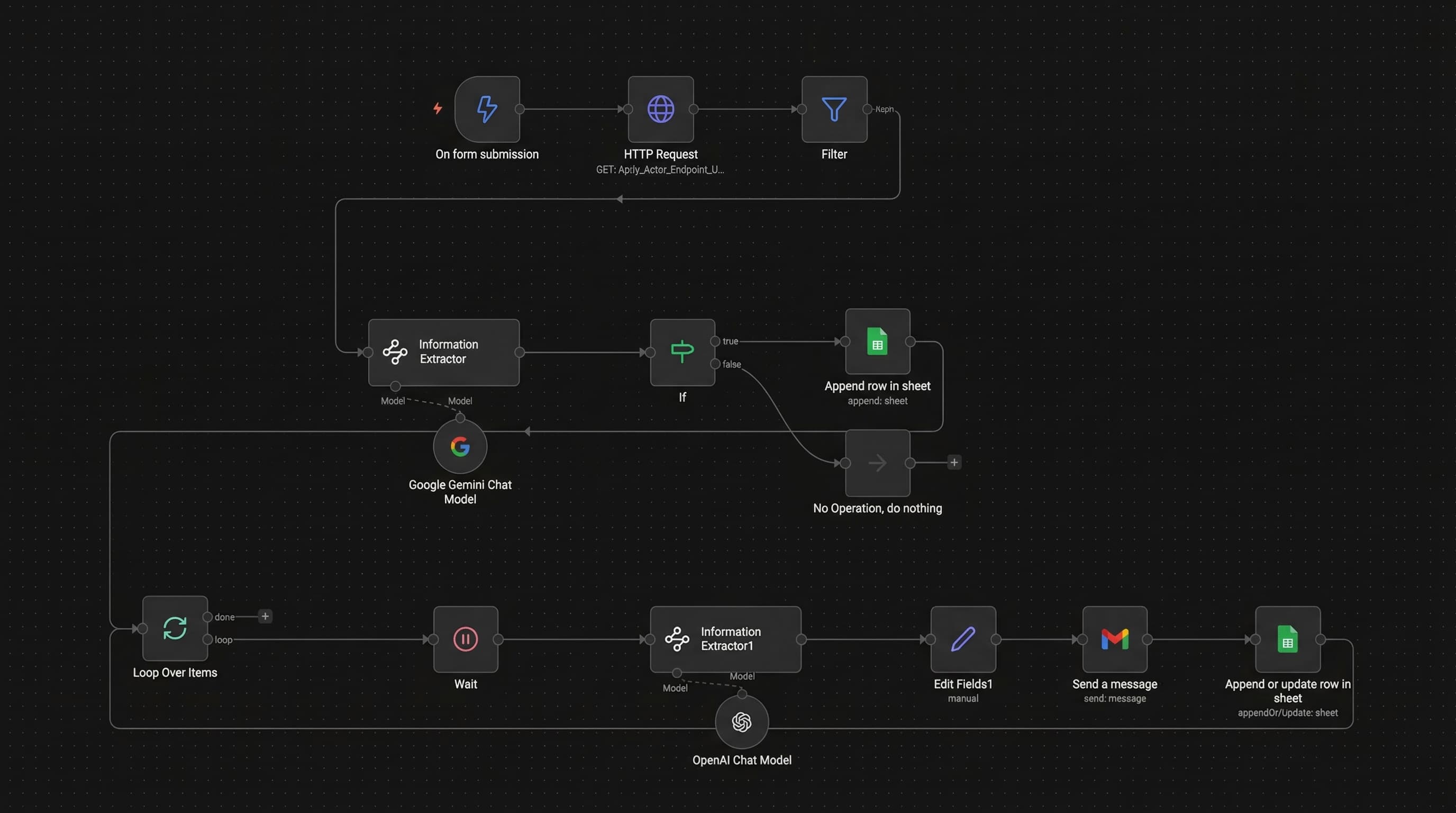
A fully automated local business lead generation and cold email outreach engine. Users submit a form specifying business type (e.g., "Plumber"), location (e.g., "Rome, Italy"), desired number of leads, and preferred email style (Friendly/Professional/Simple). The system scrapes Google Maps via Apify to collect business listings, filters results for those with websites, uses Google Gemini AI to extract email addresses from each business website, validates the emails, logs valid leads to Google Sheets, then loops through each lead with a 1-minute delay between sends -- using OpenAI GPT-4.1-mini to generate customized cold emails based on the company name, category, and selected tone -- sends via Gmail, and updates the sheet with send status and timestamp.
Tech Stack
| Layer | Technology |
|---|---|
| Automation Platform | n8n |
| Lead Scraping | Apify (Google Maps Scraper Actor) |
| Email Extraction AI | Google Gemini |
| Cold Email Generation AI | OpenAI GPT-4.1-mini |
| Email Delivery | Gmail |
| Data Storage | Google Sheets |
| Rate Limiting | n8n Wait node (1-minute delay between sends) |
| Trigger | n8n Form (business type, location, lead count, email style) |
Workflow Architecture
Form Submission (business type, location, count, style)
  -> Apify: Scrape Google Maps (business listings)
    -> Filter: Only businesses with websites
      -> Google Gemini: Extract Email from Website
        -> IF email contains "@":
          -> Google Sheets: Append Lead (company, category, website, phone, email, address)
            -> Loop Over Items (batch processing)
              -> Wait 1 minute (rate limiting)
                -> OpenAI GPT-4.1-mini: Generate Cold Email (subject + body)
                  -> Edit Fields (timestamp + email)
                    -> Gmail: Send Cold Email
                      -> Google Sheets: Update Status + Send Time
                        -> Next Lead (loop)
        -> ELSE: No Operation (skip invalid)
Business Outcomes
| Metric | Impact |
|---|---|
| Lead generation speed | Scrapes and processes 10-50+ local business leads in a single execution |
| Zero manual prospecting | Eliminates Google Maps browsing, website visiting, email hunting entirely |
| AI-personalized cold emails | Each email uniquely generated per company with chosen tone (Friendly/Professional/Simple) |
| Email deliverability | Validated "@" check prevents bounced emails from invalid extractions |
| Send rate management | 1-minute delay between sends prevents Gmail rate limiting and spam flags |
| Complete audit trail | Every lead logged with company, category, website, phone, email, address, send status, and timestamp |
| Configurable campaigns | Users control business type, geography, volume, and email tone per campaign |
Technical Metrics
| Metric | Value |
|---|---|
| Nodes in workflow | 14 |
| AI model calls per lead | 2 (Gemini for email extraction + GPT-4.1-mini for cold email) |
| External integrations | 5 (Apify, Google Gemini, OpenAI, Gmail, Google Sheets) |
| Rate limiting | 1-minute wait between email sends |
| Email validation | String contains "@" check |
| Data points per lead | 6 (company name, category, website, phone, email, address) |
| Tracking fields | 2 (Cold Mail Status, Send Time) |
| Configurable parameters | 4 (business type, location, lead count, email style) |
Estimated Cost Savings (If Implemented)
| Item | Manual Cost | Automated Cost |
|---|---|---|
| Manual prospecting per lead (20 min @ $20/hr) | $6.67/lead | ~$0.03 (Apify + AI APIs) |
| Email research + validation (10 min @ $20/hr) | $3.33/lead | Included in Gemini call |
| Cold email writing (8 min @ $20/hr) | $2.67/lead | ~$0.01 (GPT-4.1-mini) |
| 200 leads/month | $2,534/month | ~$8/month |
| Annual savings (200 leads/mo) | -- | ~$30,000/year |
| Time saved per campaign (50 leads) | ~31 hours manual | ~1 hour automated |