All Projects

AI Client Conversation Router

AI-Powered Client Conversation Router
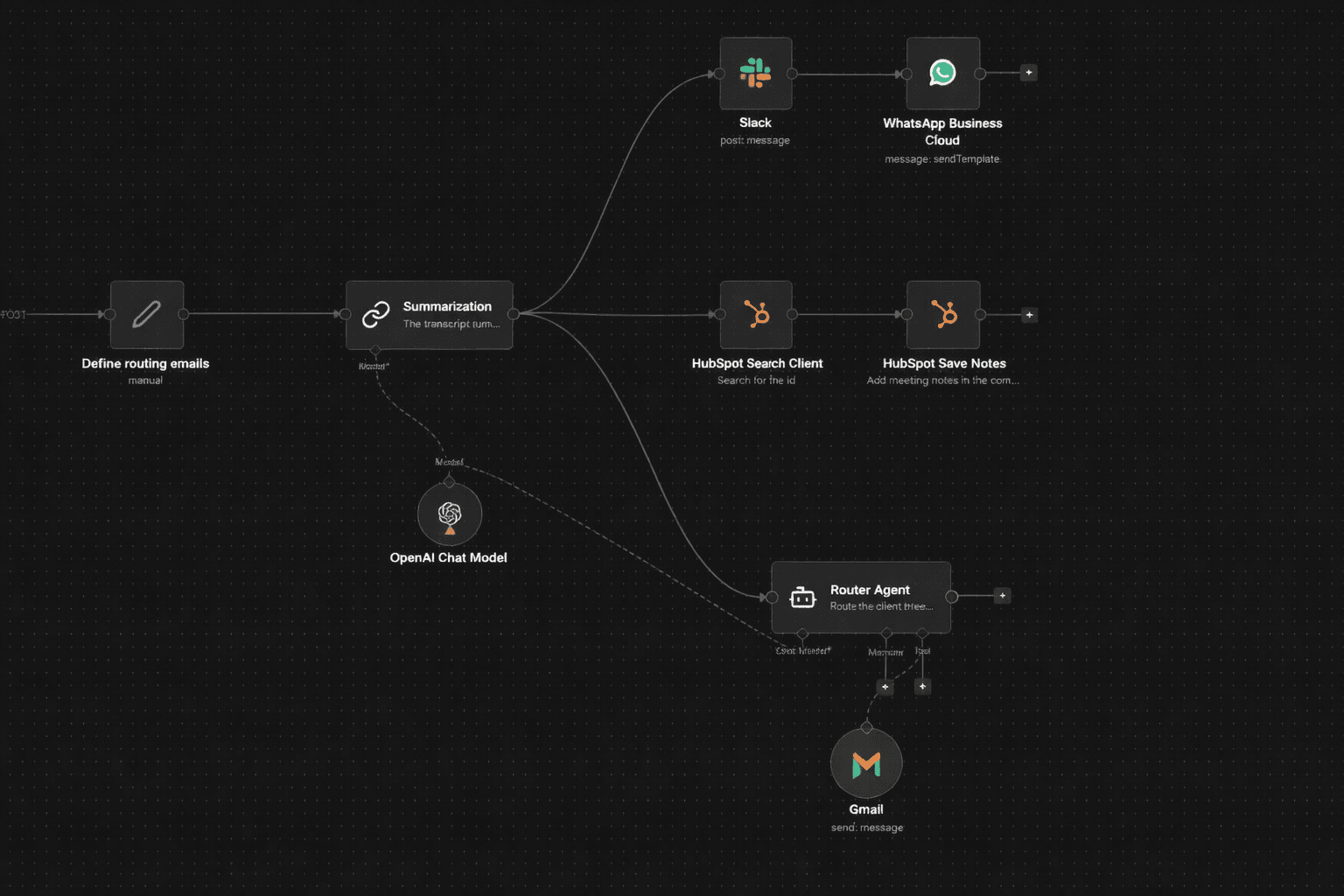
AI-Powered Client Conversation Router

A client-facing team was manually triaging every inbound conversation: reading the transcript, deciding which internal department should handle it, drafting a notification email, updating the CRM, and pinging the team on Slack. With volume growing, that process added latency between when a client raised an issue and when the right team actually saw it.

We built an n8n webhook pipeline that receives a raw client conversation, summarizes it with AI, routes a department email automatically, logs structured notes to HubSpot, and fires simultaneous notifications to Slack and WhatsApp — all from a single POST request.

The Workflow

Trigger: Webhook (HTTP POST)

Node 1 - Webhook (POST) Listens for incoming HTTP POST requests. Four fields from the request body are consumed downstream: Client Conversation (the raw transcript), Client Email (sender address, prefixed into department emails), WhatsApp Contact Number (notification recipient), and Your Name (injected into the WhatsApp template).

Node 2 - Define Routing Emails (Set) Assigns three named email addresses that the Router Agent uses to select the correct department:

  • Support Email → product-related conversations
  • Administrative Email → invoicing problems
  • Commercial Email → travel or trip-related conversations

Stage 1: Conversation Summarization

Node 3 - Summarization Chain (LangChain) Applies the "stuff" summarization method to the Client Conversation field. The prompt instructs the model to produce a 2–3 sentence summary, output only the summary text, and match the language of the original conversation. The summary produced here is the single input consumed by all three downstream branches.

Node 4 - OpenAI GPT-4o-mini (Shared Language Model) Powers both the Summarization chain and the Router Agent from a single model node, connected via ai_languageModel to both. Centralizes model configuration and credential management across all AI operations in the workflow.


Stage 2: Parallel Fan-Out (Three Branches)

Once summarization completes, three branches execute simultaneously:

  • Branch A → Router Agent → department email dispatch
  • Branch B → HubSpot contact search → HubSpot engagement note
  • Branch C → Slack post → WhatsApp notification

Stage 3: Department Email Routing (Branch A)

Node 5 - Router Agent (LangChain Agent) Receives the full Client Conversation from the webhook body. The system message instructs the agent to classify the conversation into one of three topics and dispatch a single email to the matching department address:

  • Product-related → Support Email
  • Invoicing problem → Administrative Email
  • Travel or trip-related → Commercial Email

The agent prefixes the client's email with FROM CLIENT: at the top of the email body and formats the entire body as HTML. Subject line, recipient address, and body content are all determined at runtime by the model.

Node 6 - Gmail Tool (AI-Controlled) Connected to the Router Agent as an ai_tool. All three send parameters are fully delegated to the model via $fromAI() expressions: sendTo, subject, and message. No n8n footer is appended to outgoing emails.


Stage 4: CRM Logging (Branch B)

Node 7 - HubSpot: Search Client Searches HubSpot contacts by the Client Email value from the webhook body. Returns the contact record including hs_object_id for the engagement association in the next step.

Node 8 - HubSpot: Save Meeting Notes Creates a meeting-type engagement on the matched contact. The conversation summary from the Summarization chain is written as the meeting body. The engagement is associated to the contact via hs_object_id. This gives the account owner a timestamped, structured note in HubSpot without any manual CRM entry.


Stage 5: Team Notifications (Branch C)

Node 9 - Slack Posts to the team channel immediately after summarization completes. Message text: "Below is the latest summary." followed by the full summarization output. Executes sequentially before WhatsApp in this branch.

Node 10 - WhatsApp Business Cloud Sends a templated WhatsApp message to the WhatsApp Contact Number from the webhook body. Two body parameters are injected into the template: the submitter's name and the summarization text. Fires after the Slack post in the same branch.


Results

  • Triage time reduced to seconds — inbound conversations are classified and routed without a human reading the full transcript
  • One summary, three channels — a single AI pass produces the text distributed to the department email, Slack, and WhatsApp simultaneously
  • HubSpot records stay current — every processed conversation generates a meeting engagement note linked to the correct contact by email lookup, with no manual CRM entry
  • Parallel fan-out — routing, CRM logging, and notifications all execute at the same time, minimizing end-to-end latency from webhook receipt to all channels notified
  • Shared model node — a single GPT-4o-mini configuration serves both summarization and routing, reducing credential surface and keeping model behavior consistent

Stack

LayerTool
Automationn8n (self-hosted)
TriggerWebhook (HTTP POST)
SummarizationOpenAI GPT-4o-mini (LangChain chainSummarization)
Routing AgentOpenAI GPT-4o-mini (LangChain agent)
Email DispatchGmail (gmailTool, AI-controlled parameters)
CRMHubSpot (OAuth2 — contact search + engagement write)
Team ChatSlack (OAuth2)
Mobile NotificationWhatsApp Business Cloud (template message)

My Role

  • Mapped the full triage workflow and defined the three routing categories (product, invoicing, travel) with their corresponding department email assignments
  • Configured the Summarization chain with a language-matched, 2–3 sentence output-only prompt using the "stuff" method
  • Wired the single GPT-4o-mini node as the shared language model across both the Summarization chain and the Router Agent
  • Authored the Router Agent system message with three routing rules, client email prefixing logic, and HTML body formatting instruction
  • Connected the Gmail tool to the Router Agent via ai_tool with all send parameters delegated to $fromAI() expressions
  • Structured the post-summarization fan-out so routing, CRM logging, and notifications execute in parallel from a single summarization output
  • Configured the two-node HubSpot branch: contact lookup by email followed by meeting engagement save with the summarization text as the body
  • Set up the Slack and WhatsApp nodes to deliver the summary to both channels in sequence within Branch C